Best Dive Computers for Beginners: Safety Features That Matter
Introduction
If you just got your open water certification, you are probably thinking about buying your own gear. The first piece of equipment most divers want is a dive computer. It also happens to be the piece of equipment that has the most direct impact on your safety underwater. This article is for the newly certified diver who wants to choose the best dive computer for beginners by focusing on what really matters: safety features that work in the real world.
I have seen too many beginners buy a computer with flashy specs they will never use or, worse, one that is too complicated to operate during a dive. Your first dive computer should simplify your diving, not make it more stressful. This guide will help you avoid common traps and choose a tool that genuinely supports safe, enjoyable diving from day one.
[IMAGE_1]
Why Your First Dive Computer Is a Safety Investment, Not Just a Gadget
A dive computer is not an accessory. It is a real-time monitoring system that tracks your depth, time, and nitrogen absorption. Unlike a simple depth gauge and watch, a computer constantly recalculates your no-decompression limit based on your actual dive profile. This is critical because a multi-level dive, where you ascend and descend to different depths, is very different from a square profile. A computer handles this accurately. A table and a watch do not.
Beyond tracking your nitrogen load, a modern dive computer also monitors your ascent rate. Ascending too fast is one of the most preventable causes of decompression sickness. A good computer will beep or vibrate to alert you if you are rising too quickly, something a depth gauge cannot do. It also logs every dive, which is invaluable for tracking your own patterns and seeing where you might be pushing limits. For a beginner, this reduces cognitive load. You do not have to think about tables or math. You just follow the numbers on your wrist.
Do not confuse entry-level recreational computers with advanced models. You do not need trimix capability or five-gas switching right now. A beginner computer is intentionally simpler. It makes your dive safer by removing unnecessary complexity.
Key Safety Features to Look for in a Beginner Dive Computer
When you start looking at models, you will see a lot of technical jargon. Here are the features that actually protect you. These should be your top priorities.
Algorithm Type
Most modern computers use either a ZHL-8 or ZHL-16 algorithm. In simple terms, these are the mathematical models that estimate how much nitrogen your body absorbs. The ZHL-16 is slightly more conservative and considered the gold standard today, but both are safe for recreational diving. What matters is that the algorithm is a known, tested one. Avoid no-name computers with proprietary algorithms you cannot verify. A good algorithm gives you accurate, safe no-deco times, especially if you do repetitive dives over a weekend trip.
Audible and Visual Alarms
You cannot watch your computer every second during a dive. You will be looking at fish, checking your buddy, or adjusting your buoyancy. Audible alarms for ascent rate, maximum depth, and time remaining are essential safety features. They give you a warning without requiring constant screen attention. If you are considering a model with optional air integration, that can also give you a low-air alarm, which is a very practical safety net for a beginner who might not have great gas management habits yet. Travelers who need a simple way to reduce cognitive load underwater can compare dive computers with audible alarms here.
Screen Readability and Backlight
This seems obvious, but I have seen beginners struggle to read their computer in low visibility or at night. Look for large, high-contrast digits. A bright, easy-to-activate backlight is not a luxury. It is a safety tool. You need to be able to glance and instantly read your depth and remaining no-deco time. If you have to squint or hold the computer close to your mask, it becomes a distraction. Try holding the computer at arm’s length in a store before you buy.
Battery Life and Type
Battery reliability is a huge practical concern. User-replaceable batteries (like a CR2032 or CR2450) are great because you can swap them yourself before a trip. Rechargeable lithium batteries are convenient for daily use, but they can die on a week-long liveaboard if you forget to charge. A computer with a user-replaceable battery gives you more control and less worry, especially if you are traveling to remote dive locations. Just check that the battery compartment seal is reliable.
Nitrox Compatibility
Even if you are not diving nitrox today, you probably will within your first 50 dives. Nitrox is very common for recreational diving because it extends your no-deco limits. A computer that supports nitrox up to 40% or 50% is future-proofed. More importantly, it will let you set your oxygen partial pressure limit (usually 1.4 or 1.6). Being able to set the computer for a specific nitrox blend is a basic safety feature that prevents you from exceeding safe oxygen exposure limits. Beginners may want to browse nitrox-compatible dive computers here.
Mistakes Beginners Make When Buying Their First Dive Computer
I have been on enough boats and seen enough gear fails to know what goes wrong. Let us save you some trouble.
Buying a Used Computer with an Unknown History
I once saw a diver on a boat in Cozumel pull out a used computer he bought online. Two days later, the battery died during a deep dive. He had no idea how old it was or if it had ever been serviced. A dive computer’s battery is not just a power source; it sends calibration signals to the depth sensor. An old, weak battery can cause inaccurate depth readings or sudden failure. Unless you know the full service history from an authorized dealer, do not buy a used computer.
Choosing the Wrong Mounting Style
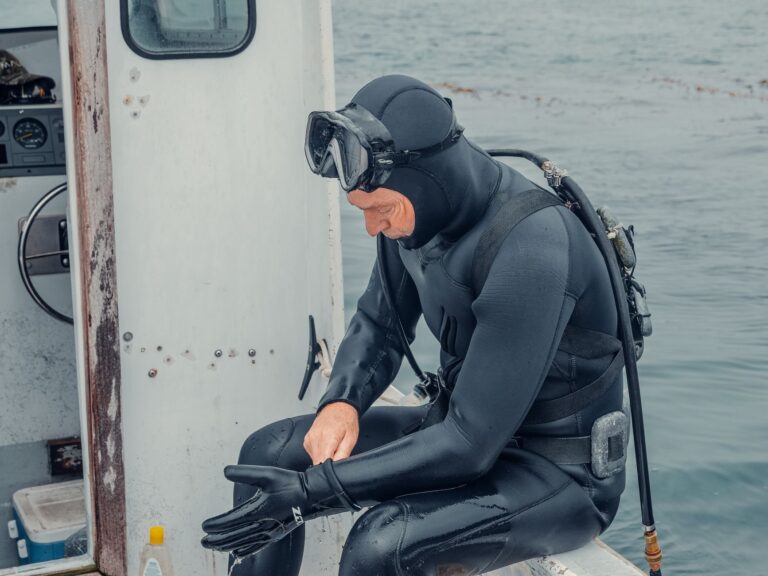
If you always dive with a console pressure gauge, a wrist-mounted computer can be awkward to reach. You have to take your hand off the console hose to check it. Similarly, if you dive in thick dry suit gloves, a wrist mount can be impossible to read because it sits under your glove seal. Try on the computer with your actual exposure suit before buying. If you cannot see it or operate the buttons easily, it will not help you underwater.
Ignoring Screen Readability
A computer can have the best algorithm in the world, but if you cannot read the screen in low light or with a fogged-up mask, it is useless. I have seen beginners buy a computer based on brand alone, only to realize on their first night dive that the numbers are tiny and the backlight is weak. Always check the screen brightness and font size in person.
Overbuying on Tech Features
Air integration with a wireless transmitter, full-color displays, and multiple gas support look cool on paper. But for a beginner, these features often complicate the interface. You will spend more time scrolling through menus than focusing on your dive. A simpler computer with fewer buttons and a clear menu structure is actually a safer choice for the first 50 dives.
[IMAGE_2]
The Best Dive Computers for Beginners: A Practical Comparison
Here are five models that reliably cover the safety features we have discussed. I have seen all of them used on boats, and each has a clear place in the beginner market.
Mares Puck Pro
The Mares Puck Pro is a strong contender for the best dive computer for beginners due to its excellent screen and simplicity. It has a large, high-contrast display with very thick digits. The single button interface is intuitive. It uses a user-replaceable battery and supports nitrox up to 99%. The algorithm is a ZHL-8 variant, which is proven and safe.
- Best For: The budget-conscious diver who wants a reliable, no-fuss computer with an easy-to-read screen.
- Avoid if: You need air integration or plan to do a lot of diving in very cold water where the screen contrast can be slightly reduced.
- Check price on Amazon.
Cressi Leonardo
The Cressi Leonardo is a classic entry-level computer with a very simple one-button interface. It is incredibly easy to set up and use. The screen is segmented, with large numbers for depth and time. The algorithm is a ZHL-16, which is conservative and safe. Battery life from a single CR2032 cell is excellent.
- Best For: The diver who wants absolute simplicity and a very low price point. It is also a favorite for use in dive training.
- Avoid if: You want a user-replaceable battery without tools (the Cressi does require a small tool to change) or if you want a full dot-matrix display for future tech diving.
- Check price on Amazon.
Suunto Zoop Novo
The Suunto Zoop Novo is known for its durability. It is housed in a very tough case and is large enough to read easily, even with thick gloves. It has a straightforward menu system and excellent audible alarms. The algorithm is Suunto’s own RGBM, which is known for being very conservative, especially on repetitive dives.
- Best For: The diver who prioritizes durability and a clear, bold display, especially for cold-water use with dry suit gloves.
- Avoid if: You find Suunto’s conservative algorithm restrictive for multi-day repetitive diving in warm water. Also, the battery requires a special tool for replacement.
- Check price on Amazon.
Oceanic Geo 4.0
The Oceanic Geo 4.0 is a step up in features while still being beginner-friendly. It has dual algorithms, which is helpful for comparing profiles. The screen is clear with a good backlight, and the interface is intuitive. It supports nitrox and has a user-replaceable battery.
- Best For: The beginner who wants a bit more control over algorithm settings and a computer that will grow with them without becoming overwhelming.
- Avoid if: You are strictly on a tight budget, as it is more expensive than the Mares or Cressi options.
- Check price on Amazon.
Shearwater Peregrine
The Shearwater Peregrine is at a higher price point, but it has an exceptionally simple user interface with a beautiful color display. The algorithm is the highly respected ZHL-16 (Bühlmann GF), which is very safe and gives you a clear visual representation of your tissue status. It is a great choice if you want to avoid overbuying tech but want premium screen quality and a modern interface.
- Best For: The beginner with a higher budget who wants exceptional screen clarity and a computer that will remain simple to use for hundreds of dives.
- Avoid if: You are an occasional diver who does not want to spend this much on your first computer.
- Check price on Amazon.
Wrist-Mounted vs. Console-Mounted: Which Is Better for Beginners?
The mounting choice is a practical decision that depends on your diving environment and existing gear.
Wrist-Mounted
A wrist-mount computer is strapped to your forearm like a watch. The advantage is that it is always accessible. You can glance at it without moving your hand from the hose console. It also frees up your console for just the pressure gauge and compass, which many divers prefer. The downside is that it can be hard to wear over thick dry suit wrist seals or with a wetsuit hood that covers your wrist. Some divers also accidentally bump it against rocks or the boat.
Console-Mounted
A console-mounted computer replaces your depth gauge on the console hose. This means it is always in the same hand as your pressure gauge, which is a clean setup. It is easier to read because it is held in front of you. The downside is that the console is bulkier and can dangle when you are on the surface. It can also be harder to see if you are swimming vertical or doing a safety stop.
My Recommendation
If you dive in warm water with a wetsuit, a wrist-mount is usually the better choice. It is more compact and less likely to snag. If you dive mainly in cold water with a dry suit, a console-mount is simpler because you do not have to worry about fitting it under your seal. Either way, make sure you can see the screen and press the buttons with your gloved hands.
How to Set Up and Test Your New Dive Computer Before Your First Dive
You have bought your computer. Do not just put it in your bag and assume it works. Take ten minutes to set it up properly.
Read the Manual
I know it sounds boring, but the manual tells you exactly how to change the battery, set the date, and configure alarms. Every model is different. Spend twenty minutes with it.
Set Personal Parameters
Before diving, set your personal depth limit, alarm thresholds for depth and time, and your altitude setting if you are diving at elevation. Also set your nitrox percentage if you intend to use it. Do this at home, not on the boat.
Run a Simulated Dive
Put the computer in a bowl of fresh water or a bucket. Turn it on and let it register a depth. Then, slowly move it up and down to trigger the audible ascent alarm. This confirms the alarm actually works and you recognize the sound. It is a simple test that catches dead batteries or factory defects.
Check the Battery
If your computer uses a user-replaceable battery, learn how to open the compartment, inspect the o-ring seal, and replace the battery. Always carry a spare battery on dive trips. It takes two minutes and saves a day of diving. Frequent users may benefit from stocking up on replacement dive computer batteries online.
When to Upgrade: What to Grow Into (Without Overbuying Now)
A good beginner dive computer should last you two to four years of regular recreational diving. That is a lot of dives. Eventually, you may feel the need to upgrade, but it should be driven by a change in your diving style, not by marketing.
Signs that you are ready to upgrade include starting technical or decompression diving, using multiple gas mixes (like nitrox for bottom time and pure oxygen for deco), or doing many repetitive deep dives where a conservative recreational algorithm becomes restrictive. If you are diving with a team and need more advanced features like a compass or the ability to transfer dive logs easily, you might want a more advanced computer.
Here is the good news. Even after you upgrade, your beginner computer does not become useless. It becomes an excellent backup computer. You can strap it to your wrist and use it as a secondary data source. It remains a reliable tool for anyone who dives recreationally. Buying a solid beginner computer now is not a waste of money. It is a smart, long-term safety investment.
[IMAGE_3]
Caring for Your Dive Computer: Simple Habits That Keep It Reliable
Your computer is a precision instrument. Treat it with basic care, and it will be reliable for years.
After every dive day, rinse your computer in fresh, cool water. Pay attention to the buttons and the battery compartment seal. Do not use a high-pressure hose, which can force water into sensitive areas. Dry it with a soft cloth and store it in a cool, dark place away from direct sunlight or extreme heat.
Check the battery compartment o-ring every time you change the battery. A tiny crack or bit of sand can cause a slow leak that eventually floods the case. If your computer has a user-replaceable battery, always keep the contact points clean and dry.
Avoid exposing your computer to strong solvents like acetone or alcohol, and do not store it in the same bag as sunscreen or insect repellent, which can degrade the plastic and screen coating over time. A little daily habit goes a long way in keeping your computer safe and your dives safe.
Final Recommendation: Which Dive Computer Should a Beginner Buy?
After years of seeing what works and what breaks, the most reliable and practical choice for most beginners is the Mares Puck Pro. It has the best screen clarity for a budget computer, a simple interface, a proven algorithm, and a user-replaceable battery. It does everything a recreational diver needs without overcomplicating anything.
If your budget is very tight or you want the simplest possible computer for occasional diving, the Cressi Leonardo is a close second. It is a no-nonsense tool that will keep you safe.
Before you click buy, go back to the safety feature list. Check that the computer you choose has audible alarms, a screen you can read, and a user-replaceable battery. Do not let flashy features distract you from the fundamentals. Your first dive computer should make you feel more confident, not more anxious.
Now, make your decision, get it in your hands, run that freshwater test, and get in the water. Your next dive is going to be safer and more enjoyable with the right tool on your wrist.